Hi Guys,
In this post we are going to see how to create a spring rest web-service with JSON as request and response. I have seen most of the guys are struggling with JSON as request and response in spring applications.
Lets see how to implement spring rest service with JSON using simple employee details processing.
Step 1: Create Java Maven Web application. Add the below dependencies in to your pom.xml
Step 2: Create Employee bean for our request and response processing.
@JsonIgnoreProperties(ignoreUnknown = true)
public class Employee {
private Integer id;
private String name;
private String address;
private Integer salary;
//getter's and setter's
}
Step 3: Create our Employee Interface for request mapping and response processing using JSON.
@RequestMapping(value = "/employee")
public interface IEmployee {
@RequestMapping(value = "/createEmployee", method = RequestMethod.POST, produces="application/json", consumes="application/json")
public @ResponseBody Employee createEmployee(@RequestBody Employee emp);
@RequestMapping(value = "/getAllEmployees", method = RequestMethod.POST, produces="application/json", consumes="application/json")
public @ResponseBody String getAllEmployees();
@RequestMapping(value = "/getEmployee/{id}", method = RequestMethod.POST, produces="application/json", consumes="application/json")
public @ResponseBody Employee getEmployee(@PathVariable("id") int empId);
}
Here I am using @RequestMapping for mapping for services with spring application, My method is always POST method. My services will produce and consume JSON data so we need to use our media type as application/json.
@RequestBoby will map my request JSON data with my Employee Bean.
@PathVariable("id") will map my employee id with my Employee bean
@ResponseBoby will return convert my response in to JSON object.
I am having 3 services in my employee application
1. /createEmployee - For creating Employee details.
2. /getAllEmployees - For getting list of all employees.
3. /getEmployee/{id} - For getting a particular employee by id.
So my services look like this.
http://localhost:8080/springrestservice/employee/createEmployee , In the same way u can call getAllEmployees and getEmployee/1. Here springrestservice is my project name.
Step 4: Create our Employee Controller
import java.util.HashMap;
import java.util.Map;
import org.codehaus.jackson.map.ObjectMapper;
import org.springframework.stereotype.Controller;
import org.springframework.web.bind.annotation.PathVariable;
import org.springframework.web.bind.annotation.RequestBody;
@Controller
public class EmployeeController implements IEmployee {
Map<Integer, Employee> empData = new HashMap<Integer, Employee>();
ObjectMapper objectMapper = new ObjectMapper();
public Employee createEmployee(@RequestBody Employee emp) {
empData.put(emp.getId(), emp);
return emp;
}
public String getAllEmployees() {
String allEmployees;
try {
allEmployees = objectMapper.writeValueAsString(empData);
} catch (Exception e) {
return "Exception Occured";
}
return allEmployees;
}
public Employee getEmployee(@PathVariable("id") int empId) {
return empData.get(empId);
}
}
In My controller i have a HashMap which used to store all employee details and later we can able to fetch the details based on the request. ObjectMapper is a Jackson class which used to write my data back to JSON while sending response.
Step 5: web.xml and dispatcher servlet.xml
web.xml
<web-app version="3.0"
xmlns="http://java.sun.com/xml/ns/javaee"
xmlns:xsi="http://www.w3.org/2001/XMLSchema-instance"
xsi:schemaLocation="http://java.sun.com/xml/ns/javaee
http://java.sun.com/xml/ns/javaee/web-app_3_0.xsd"
metadata-complete="true">
<display-name>Archetype Created Web Application</display-name>
<listener>
<listener-class>org.springframework.web.context.ContextLoaderListener</listener-class>
</listener>
<servlet>
<servlet-name>dispatcher</servlet-name>
<servlet-class>org.springframework.web.servlet.DispatcherServlet</servlet-class>
<load-on-startup>1</load-on-startup>
</servlet>
<servlet-mapping>
<servlet-name>dispatcher</servlet-name>
<url-pattern>/*</url-pattern>
</servlet-mapping>
<context-param>
<param-name>contextConfigLocation</param-name>
<param-value>/WEB-INF/dispatcher-servlet.xml</param-value>
</context-param>
</web-app>
dispatcher-servlet.xml
Just add the below lines to your servlet.xml
<context:component-scan base-package="in.springrestservice"/>
<mvc:annotation-driven />
Note: If your deploying your application in Jboss Server add the jackson dependencies in your jboss-deployment-structure.xml. When server started all these dependencies will add to class loading.
<jboss-deployment-structure xmlns="urn:jboss:deployment-structure:1.2">
<deployment>
<dependencies>
<module name="org.codehaus.jackson.jackson-core-asl"/>
<module name="org.codehaus.jackson.jackson-mapper-asl"/>
<module name="org.slf4j"/>
</dependencies>
</deployment>
</jboss-deployment-structure>
Project Structure:

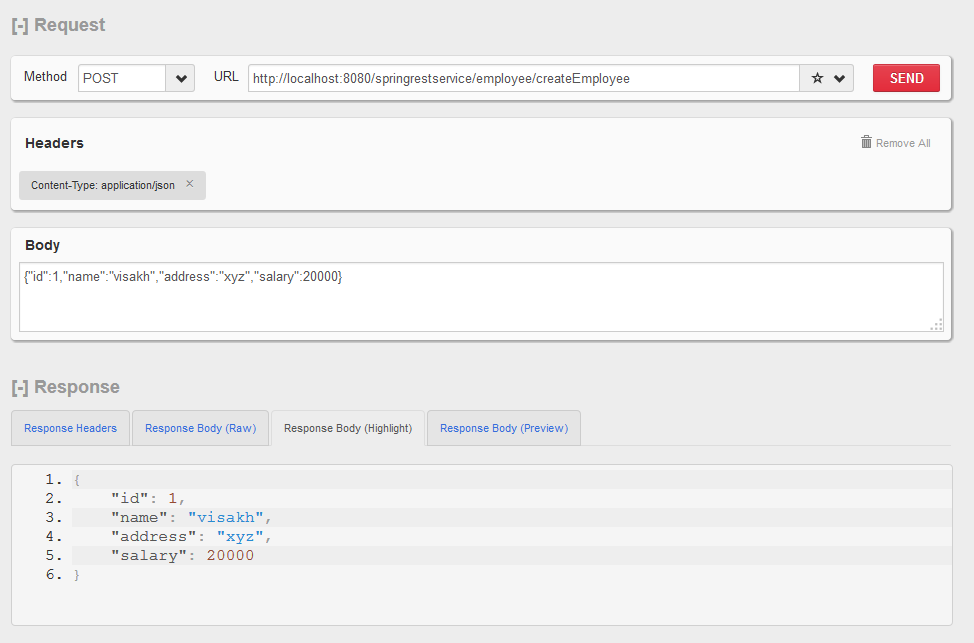
Let's test our application with the above services. Use Mozilla Rest Client or Chrome Client.
1. CreateEmployee
Insert employees as much as you can. You will get the response as a JSON data with inserted employee details.


That's all Folks.. Hope you all got idea on Spring rest service with JSON.
In this post we are going to see how to create a spring rest web-service with JSON as request and response. I have seen most of the guys are struggling with JSON as request and response in spring applications.
Lets see how to implement spring rest service with JSON using simple employee details processing.
Step 1: Create Java Maven Web application. Add the below dependencies in to your pom.xml
<dependency>
<groupId>org.springframework</groupId>
<artifactId>spring-aop</artifactId>
<version>3.2.2.RELEASE</version>
</dependency>
<dependency>
<groupId>org.springframework</groupId>
<artifactId>spring-beans</artifactId>
<version>3.2.2.RELEASE</version>
</dependency>
<dependency>
<groupId>org.springframework</groupId>
<artifactId>spring-context</artifactId>
<version>3.2.2.RELEASE</version>
</dependency>
<dependency>
<groupId>org.springframework</groupId>
<artifactId>spring-context-support</artifactId>
<version>3.2.2.RELEASE</version>
</dependency>
<dependency>
<groupId>org.springframework</groupId>
<artifactId>spring-core</artifactId>
<version>3.2.2.RELEASE</version>
</dependency>
<dependency>
<groupId>org.springframework</groupId>
<artifactId>spring-expression</artifactId>
<version>3.2.2.RELEASE</version>
</dependency>
<dependency>
<groupId>org.springframework</groupId>
<artifactId>spring-test</artifactId>
<version>3.2.2.RELEASE</version>
<scope>test</scope>
</dependency>
<dependency>
<groupId>org.springframework</groupId>
<artifactId>spring-web</artifactId>
<version>3.2.2.RELEASE</version>
</dependency>
<dependency>
<groupId>org.springframework</groupId>
<artifactId>spring-webmvc</artifactId>
<version>3.2.2.RELEASE</version>
</dependency>
<!-- Other community dependencies -->
<dependency>
<groupId>commons-logging</groupId>
<artifactId>commons-logging</artifactId>
<version>1.1.1</version>
</dependency>
<dependency>
<groupId>commons-io</groupId>
<artifactId>commons-io</artifactId>
<version>2.4</version>
</dependency>
<dependency>
<groupId>javax.servlet</groupId>
<artifactId>javax.servlet-api</artifactId>
<version>3.0.1</version>
</dependency>
<dependency>
<groupId>org.codehaus.jackson</groupId>
<artifactId>jackson-mapper-asl</artifactId>
<version>1.9.3</version>
<scope>provided</scope>
</dependency>
<dependency>
<groupId>org.codehaus.jackson</groupId>
<artifactId>jackson-core-asl</artifactId>
<version>1.9.3</version>
<scope>provided</scope>
</dependency>
<groupId>org.springframework</groupId>
<artifactId>spring-aop</artifactId>
<version>3.2.2.RELEASE</version>
</dependency>
<dependency>
<groupId>org.springframework</groupId>
<artifactId>spring-beans</artifactId>
<version>3.2.2.RELEASE</version>
</dependency>
<dependency>
<groupId>org.springframework</groupId>
<artifactId>spring-context</artifactId>
<version>3.2.2.RELEASE</version>
</dependency>
<dependency>
<groupId>org.springframework</groupId>
<artifactId>spring-context-support</artifactId>
<version>3.2.2.RELEASE</version>
</dependency>
<dependency>
<groupId>org.springframework</groupId>
<artifactId>spring-core</artifactId>
<version>3.2.2.RELEASE</version>
</dependency>
<dependency>
<groupId>org.springframework</groupId>
<artifactId>spring-expression</artifactId>
<version>3.2.2.RELEASE</version>
</dependency>
<dependency>
<groupId>org.springframework</groupId>
<artifactId>spring-test</artifactId>
<version>3.2.2.RELEASE</version>
<scope>test</scope>
</dependency>
<dependency>
<groupId>org.springframework</groupId>
<artifactId>spring-web</artifactId>
<version>3.2.2.RELEASE</version>
</dependency>
<dependency>
<groupId>org.springframework</groupId>
<artifactId>spring-webmvc</artifactId>
<version>3.2.2.RELEASE</version>
</dependency>
<!-- Other community dependencies -->
<dependency>
<groupId>commons-logging</groupId>
<artifactId>commons-logging</artifactId>
<version>1.1.1</version>
</dependency>
<dependency>
<groupId>commons-io</groupId>
<artifactId>commons-io</artifactId>
<version>2.4</version>
</dependency>
<dependency>
<groupId>javax.servlet</groupId>
<artifactId>javax.servlet-api</artifactId>
<version>3.0.1</version>
</dependency>
<dependency>
<groupId>org.codehaus.jackson</groupId>
<artifactId>jackson-mapper-asl</artifactId>
<version>1.9.3</version>
<scope>provided</scope>
</dependency>
<dependency>
<groupId>org.codehaus.jackson</groupId>
<artifactId>jackson-core-asl</artifactId>
<version>1.9.3</version>
<scope>provided</scope>
</dependency>
Step 2: Create Employee bean for our request and response processing.
@JsonIgnoreProperties(ignoreUnknown = true)
public class Employee {
private Integer id;
private String name;
private String address;
private Integer salary;
//getter's and setter's
}
Step 3: Create our Employee Interface for request mapping and response processing using JSON.
@RequestMapping(value = "/employee")
public interface IEmployee {
@RequestMapping(value = "/createEmployee", method = RequestMethod.POST, produces="application/json", consumes="application/json")
public @ResponseBody Employee createEmployee(@RequestBody Employee emp);
@RequestMapping(value = "/getAllEmployees", method = RequestMethod.POST, produces="application/json", consumes="application/json")
public @ResponseBody String getAllEmployees();
@RequestMapping(value = "/getEmployee/{id}", method = RequestMethod.POST, produces="application/json", consumes="application/json")
public @ResponseBody Employee getEmployee(@PathVariable("id") int empId);
}
Here I am using @RequestMapping for mapping for services with spring application, My method is always POST method. My services will produce and consume JSON data so we need to use our media type as application/json.
@RequestBoby will map my request JSON data with my Employee Bean.
@PathVariable("id") will map my employee id with my Employee bean
@ResponseBoby will return convert my response in to JSON object.
I am having 3 services in my employee application
1. /createEmployee - For creating Employee details.
2. /getAllEmployees - For getting list of all employees.
3. /getEmployee/{id} - For getting a particular employee by id.
So my services look like this.
http://localhost:8080/springrestservice/employee/createEmployee , In the same way u can call getAllEmployees and getEmployee/1. Here springrestservice is my project name.
Step 4: Create our Employee Controller
import java.util.HashMap;
import java.util.Map;
import org.codehaus.jackson.map.ObjectMapper;
import org.springframework.stereotype.Controller;
import org.springframework.web.bind.annotation.PathVariable;
import org.springframework.web.bind.annotation.RequestBody;
@Controller
public class EmployeeController implements IEmployee {
Map<Integer, Employee> empData = new HashMap<Integer, Employee>();
ObjectMapper objectMapper = new ObjectMapper();
public Employee createEmployee(@RequestBody Employee emp) {
empData.put(emp.getId(), emp);
return emp;
}
public String getAllEmployees() {
String allEmployees;
try {
allEmployees = objectMapper.writeValueAsString(empData);
} catch (Exception e) {
return "Exception Occured";
}
return allEmployees;
}
public Employee getEmployee(@PathVariable("id") int empId) {
return empData.get(empId);
}
}
In My controller i have a HashMap which used to store all employee details and later we can able to fetch the details based on the request. ObjectMapper is a Jackson class which used to write my data back to JSON while sending response.
Step 5: web.xml and dispatcher servlet.xml
web.xml
<web-app version="3.0"
xmlns="http://java.sun.com/xml/ns/javaee"
xmlns:xsi="http://www.w3.org/2001/XMLSchema-instance"
xsi:schemaLocation="http://java.sun.com/xml/ns/javaee
http://java.sun.com/xml/ns/javaee/web-app_3_0.xsd"
metadata-complete="true">
<display-name>Archetype Created Web Application</display-name>
<listener>
<listener-class>org.springframework.web.context.ContextLoaderListener</listener-class>
</listener>
<servlet>
<servlet-name>dispatcher</servlet-name>
<servlet-class>org.springframework.web.servlet.DispatcherServlet</servlet-class>
<load-on-startup>1</load-on-startup>
</servlet>
<servlet-mapping>
<servlet-name>dispatcher</servlet-name>
<url-pattern>/*</url-pattern>
</servlet-mapping>
<context-param>
<param-name>contextConfigLocation</param-name>
<param-value>/WEB-INF/dispatcher-servlet.xml</param-value>
</context-param>
</web-app>
dispatcher-servlet.xml
Just add the below lines to your servlet.xml
<context:component-scan base-package="in.springrestservice"/>
<mvc:annotation-driven />
Note: If your deploying your application in Jboss Server add the jackson dependencies in your jboss-deployment-structure.xml. When server started all these dependencies will add to class loading.
<jboss-deployment-structure xmlns="urn:jboss:deployment-structure:1.2">
<deployment>
<dependencies>
<module name="org.codehaus.jackson.jackson-core-asl"/>
<module name="org.codehaus.jackson.jackson-mapper-asl"/>
<module name="org.slf4j"/>
</dependencies>
</deployment>
</jboss-deployment-structure>
Project Structure:
Let's test our application with the above services. Use Mozilla Rest Client or Chrome Client.
1. CreateEmployee
Insert employees as much as you can. You will get the response as a JSON data with inserted employee details.
2. GetALLEmployees
Get all employees from our Map we stored in the previous call. We will get all the employees we inserted in to our Map.
3. GetEmployeeById
Get a particular employee from the Map using employee Id.